


Description
Product Overview
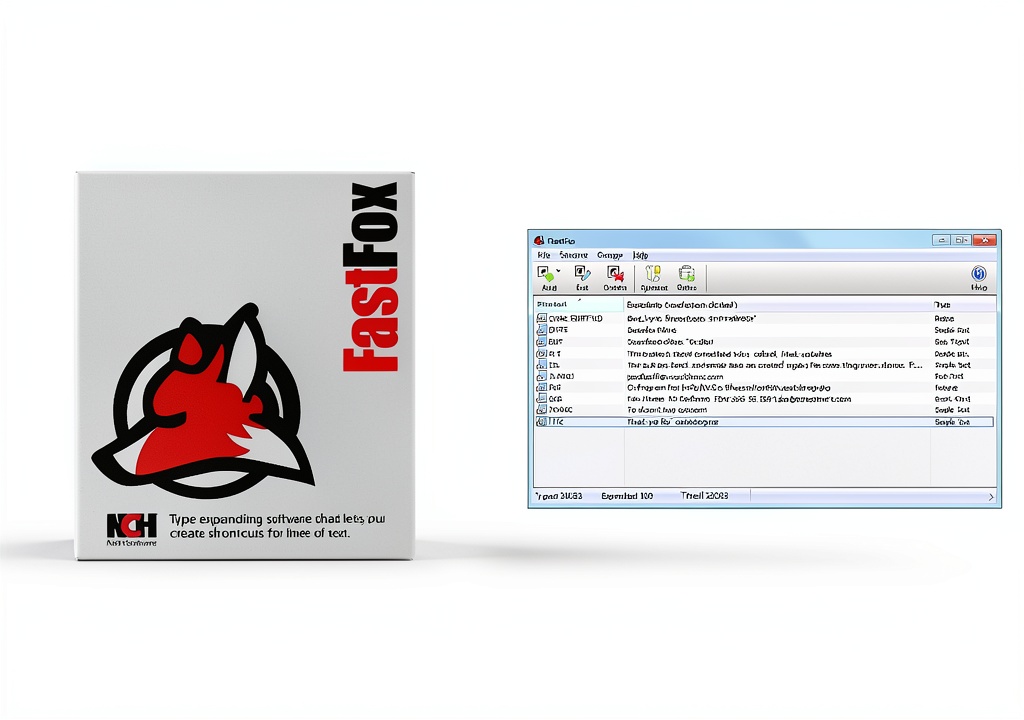
FastFox Text Expander is a versatile software solution designed to streamline the process of entering repetitive text across a wide range of applications. Built on a lightweight engine, the program allows users to define custom shortcuts that automatically expand into full sentences, paragraphs, or even complex code snippets with a single keystroke. The activation key included with the purchase grants a one‑time license that can be applied to any Windows‑based computer or laptop, regardless of geographic location. This flexibility makes the tool ideal for professionals, students, and hobbyists who need to improve productivity while maintaining accuracy.
The software supports unlimited shortcut creation, case‑sensitive matching, and integration with popular word processors, email clients, and web browsers. Its intuitive interface provides a clear overview of all defined shortcuts, enabling quick edits, imports, and exports. By reducing the amount of manual typing required, FastFox Text Expander helps prevent repetitive strain injuries and frees up valuable time for more creative or analytical tasks. Advanced users can also leverage the built‑in scripting engine to create dynamic placeholders that insert the current date, time, or user‑defined variables, further extending the utility of each shortcut.
Usage
Typical usage scenarios include drafting family history reports, preparing genealogical records, writing academic papers, composing business correspondence, and coding software projects. Users can assign shortcuts for frequently used phrases such as “Born on”, “Deceased”, or “Source citation” when working on genealogy documents, ensuring consistency across multiple files. In a corporate environment, the tool can be employed to insert standard legal clauses, confidentiality statements, or branding slogans with minimal effort.
Because the activation key works on any computer or laptop, teams can share the same license across multiple workstations, provided the software is installed on only one device at a time. The program runs silently in the background, consuming negligible system resources, and can be toggled on or off with a simple hotkey. Whether you are a writer, researcher, programmer, or casual user, FastFox Text Expander adapts to your workflow and accelerates the creation of high‑quality content. It also integrates with cloud‑based document editors, allowing shortcuts to function seamlessly whether the document is stored locally or accessed through a web service.
Why Choose Us
Choosing FastFox Text Expander means selecting a product backed by a dedicated development team that prioritizes reliability, security, and user satisfaction. The software undergoes regular updates to maintain compatibility with the latest operating system releases and to introduce new features based on customer feedback. Our single‑device activation model eliminates the complexity of managing multiple keys, while still offering the freedom to install the program on any computer you own.
We provide comprehensive documentation, video tutorials, and responsive technical support to help you get the most out of your purchase. Additionally, the product is built with clean, modular code that respects user privacy; no personal data is collected or transmitted without explicit consent. By investing in FastFox, you gain a trustworthy productivity companion that will continue to serve you for years without hidden fees or subscription traps. Our roadmap includes planned enhancements such as cross‑platform support, cloud synchronization of shortcut libraries, and AI‑assisted suggestion of new shortcuts based on your typing habits.
Key Features
- Unlimited custom shortcuts let you replace repetitive text with a single keystroke, saving hours of typing each week.
- One‑time activation key works on any Windows computer or laptop worldwide, simplifying installation and licensing.
- Lightweight design runs in the background without slowing down other applications, ensuring smooth multitasking.
- Full compatibility with major word processors, email clients, and web browsers for seamless integration into any workflow.
- Responsive customer support and regular software updates guarantee long‑term reliability and feature enhancements.
FAQ
How do I install FastFox Text Expander on my computer?
Download the installer from the provided link, run the executable, and follow the on‑screen prompts. When prompted, enter the activation key included with your purchase. The software will register the license and become ready for use after a brief restart.
Can I transfer the license to a new computer?
Yes. Deactivate the software on the current device through the settings menu, then install the program on the new computer and enter the same activation key. The key can only be active on one device at a time.
Is the software compatible with macOS or Linux?
FastFox Text Expander is currently developed for Windows operating systems only. We are evaluating demand for macOS and Linux versions and may release cross‑platform support in future updates.
What types of shortcuts can I create?
You can create shortcuts for plain text, formatted text, HTML snippets, code blocks, and even dynamic variables such as date and time. Each shortcut can be assigned a unique trigger phrase that is case‑sensitive if desired.
Do you offer refunds or a trial period?
We provide a 30‑day money‑back guarantee for customers who are not satisfied with the product. If you encounter any issues during the trial period, contact our support team for assistance or a full refund.


Reviews
There are no reviews yet.